
Troubleshooting Handling Noise in Field Recording Equipment
Handling noise is unwanted sound created when touch or movement transfers mechanical vibration through the recording setup and into a microphone or recorder. Diagnose it by reproducing the noise while changing one movement path at a time, then reduce it by controlling that contact path, adding suitable isolation, securing the cable or stabilising the support. If the noise persists without the tested movement, recheck wind, electrical or other sources instead of assuming a handling-noise cause.
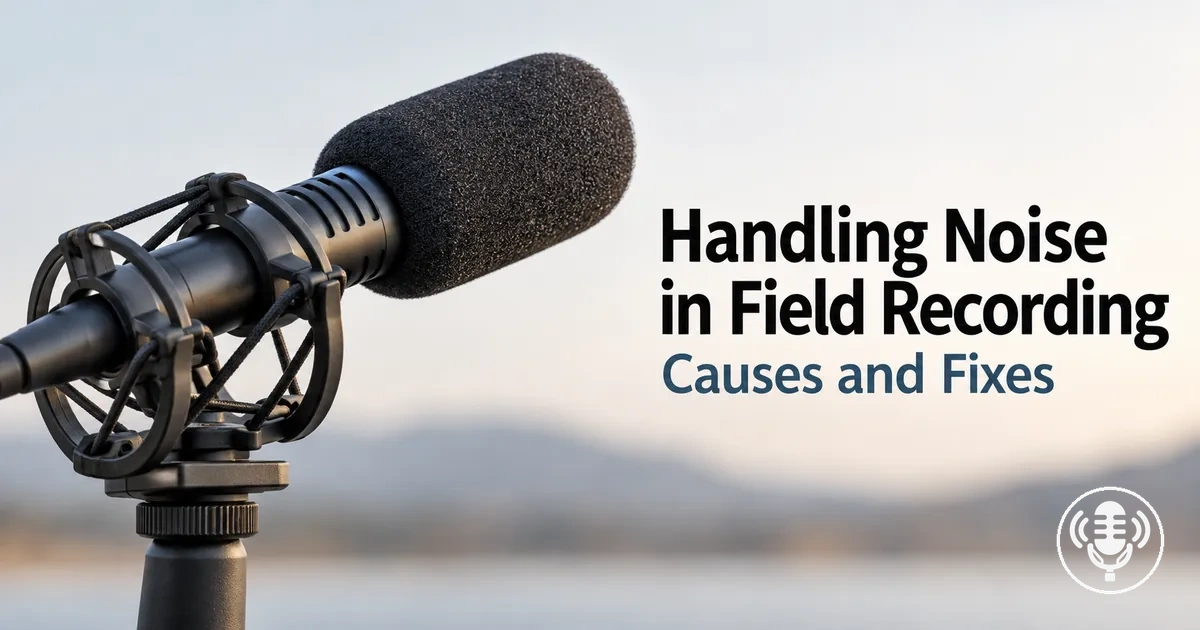
Mechanical vibration can reach the recording path through grip, cable, mount, recorder or support contact.
Handling-noise troubleshooting map
Use the physical action that reliably reproduces the noise to choose the path to inspect. Audible character is a clue, but a repeatable relationship with touch or movement is the stronger diagnostic signal.
If grip, body or mount contact reproduces the noise
- Likely path
- Hand movement or rigid mount contact into the microphone.
- First response
- Use a steadier grip or interrupt the vibration path with suitable mount or suspension isolation.
If cable or connector movement reproduces the noise
- Likely path
- Cable-borne vibration, rubbing, strain or connector contact.
- First response
- Route and restrain the cable with enough slack to avoid rubbing, strain and a rigid bypass around isolation.
If recorder, stand, boom or support contact reproduces the noise
- Likely path
- Support-borne vibration through a joint, surface or other mechanical contact.
- First response
- Stabilise the identified support point or improve isolation at that contact, then repeat the same test.
If the noise continues without physical movement
- Interpretation
- A handling-noise explanation becomes weaker because the expected mechanical trigger is absent.
- Next check
- Check airflow, the electrical or signal path, or broader equipment faults instead of applying a mechanical fix by default.
Confirmation rule: keep other conditions as stable as practical and repeat the same controlled movement before and after the change. A repeatable reduction supports the fix; sound character alone does not prove the cause.
The sections below distinguish handling noise from other recording noise, map the main mechanical transfer routes, and match each diagnosed path to a practical control.
Table of Contents
What Handling Noise Is in Field Recording Equipment
Handling noise is mechanically transmitted sound or vibration created when field recording equipment is touched, moved, gripped, supported or affected by cable movement.

Reproducing the unwanted sound through the same physical movement supports a handling-noise interpretation.
If the noise continues without touch or movement, a different source may require diagnosis.
How Handling Noise Differs From Wind and Electrical Noise
Handling noise is associated with mechanical contact or vibration, wind noise with turbulent airflow at the microphone, and electrical noise with the electrical or signal path.
The trigger and source mechanism are more diagnostic than audible character alone because similar sounds can arise from different causes.
Handling noise differs from wind and electrical noise by source mechanism, trigger, audible clue, confirming check, and first response.
These dimensions help classify recording-noise behaviour without treating rumble, hum, or another audible characteristic as proof of cause.
For handling noise, the strongest confirming check is whether the noise can be reproduced through touch or movement.
| Noise type | Primary trigger | Typical clue | Confirming check | First response |
|---|---|---|---|---|
| Handling noise | Touch, movement, or vibration through mechanical contact | May present as thumps, scraping, knocks, or rumble | Check whether the noise repeats with the same touch or movement | Identify the mechanical contact point and control vibration transfer |
| Wind noise | Turbulent airflow at the microphone | May present as irregular rumble or buffeting | Check whether the noise changes with airflow rather than equipment movement | Address airflow at the microphone |
| Electrical noise | Disturbance in the electrical or signal path | May present as hum or interference | Check whether the noise persists without physical movement or airflow and follows the signal path | Inspect the relevant electrical or signal-path source |
The comparison graphic visualizes how mechanical vibration, airflow, and signal-path disturbance reach the recording chain through different physical or electrical paths rather than repeating the diagnostic criteria in the table.
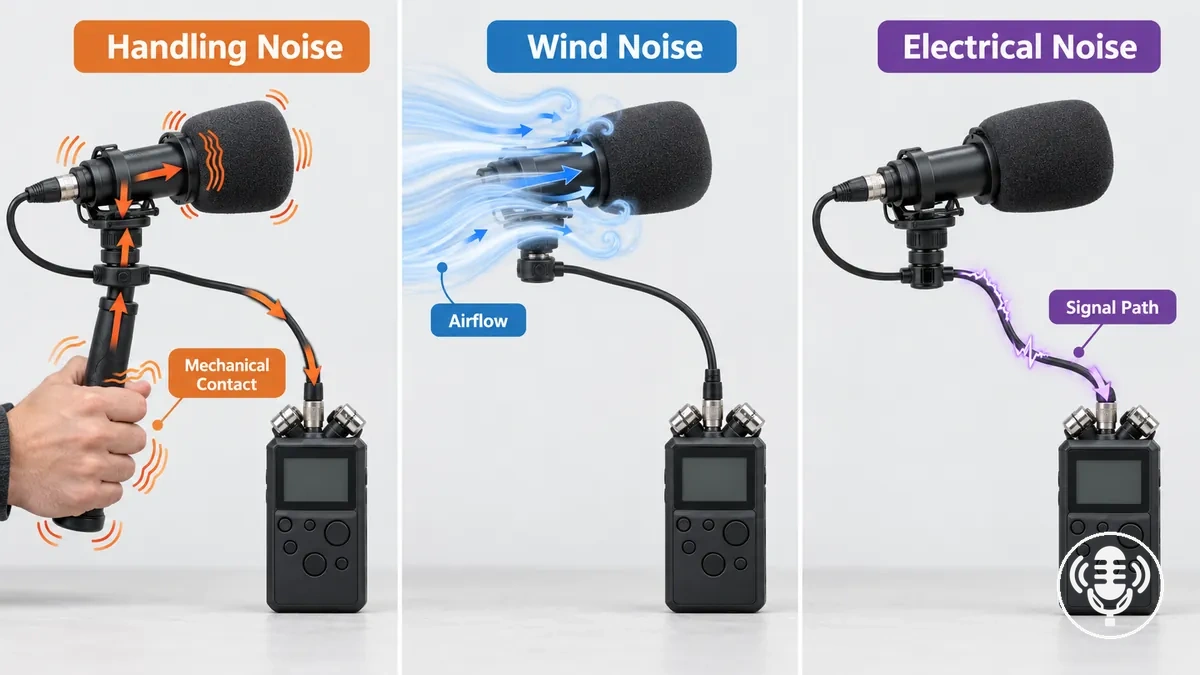
For example, low-frequency rumble can be consistent with either wind noise or handling noise, so rumble or frequency alone does not establish the cause; repeatable noise from touching or moving the equipment points more strongly toward handling noise.
If airflow instead triggers the noise, the first direction is wind-specific mitigation, while noise associated with the electrical or signal path calls for electrical diagnosis rather than mechanical treatment.
Common Sources of Handling Noise in Field Recording Equipment
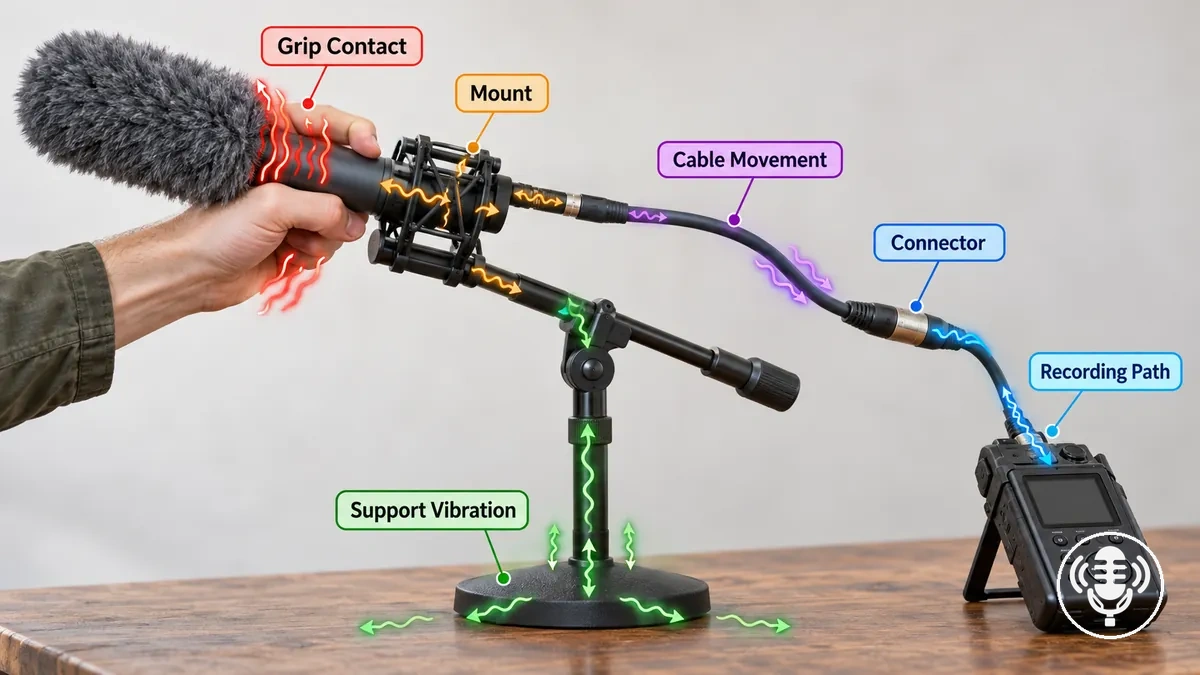
Handling noise usually enters field recording equipment through a small set of physical routes where contact or movement transfers vibration toward the recording path.
The diagram maps the common sources of handling noise in field recording equipment by showing the main physical transfer routes, which include grip contact or microphone-body contact through a mount, cable movement at a connector, and support vibration from a recorder, stand, boom, or support surface.
Microphone Grip, Body and Mount Contact
A hand touching or repositioning the microphone or mount creates distinct points where movement can enter the recording setup.
Microphone grip, body contact and mount contact can each transfer vibration into the microphone.
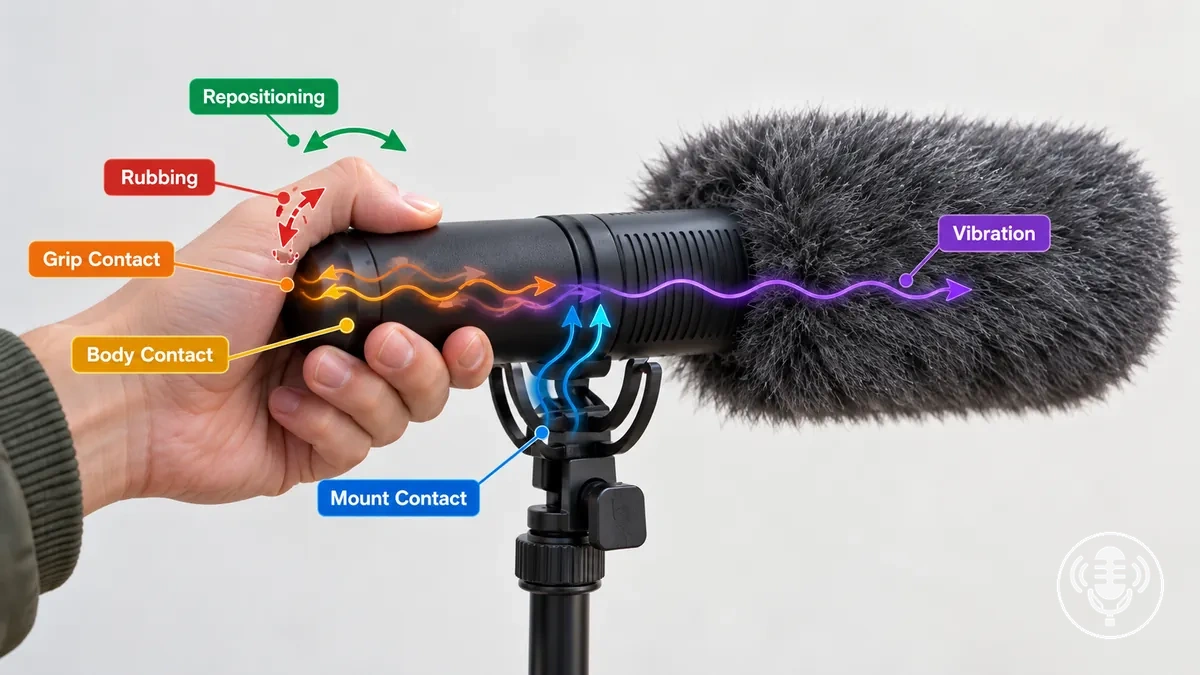
Squeezing the grip can transmit hand movement, rubbing against the microphone body can produce a scrape or similar mechanical sound, repositioning can produce a thump, and rigid coupling at the mount can carry movement into the microphone; how strongly these symptoms appear depends on microphone construction and mounting.
Handling characteristics can therefore be a broader microphone selection consideration, but for local diagnosis, reproduce one contact condition at a time and check whether the same symptom follows that movement.
Cable Movement and Connector Contact
Cable movement can create mechanical noise when a microphone cable is rubbing against a surface, placed under strain or unsupported weight, or moving at the connector.
Cable movement and connector contact can form a physical vibration path into the microphone or recorder, while electrical hum is a separate type of problem.
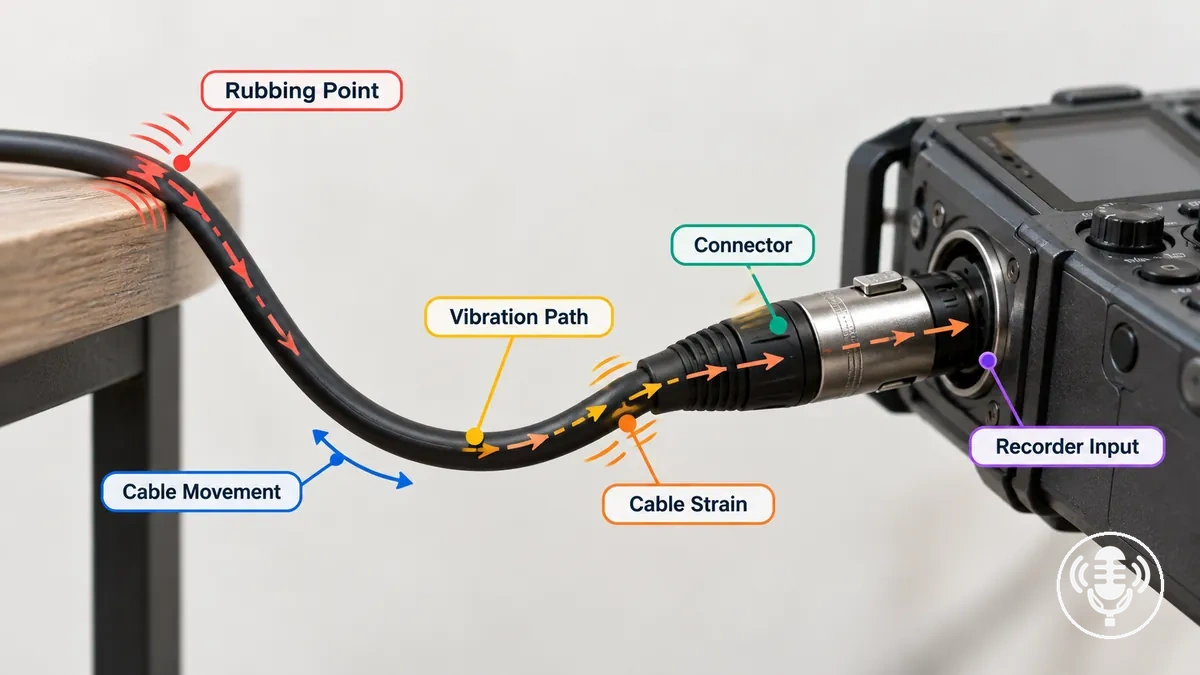
For example, controlled movement of the microphone cable or connector can help isolate the physical path: reproduce rubbing, strain, or connector movement separately and check whether the same symptom follows the tested condition.
A symptom that consistently follows mechanical movement supports a cable-borne vibration or connector-contact path rather than an RF-related electrical interpretation, but movement-related noise alone does not prove that the cable or connector is defective.
Recorder, Stand and Support Vibration
Support-borne handling noise occurs when movement at a recorder, stand, boom, tripod or supporting surface travels through a physical contact path into the recording equipment.
- Trigger
- Touching or moving the recorder support, stand, boom, tripod or supporting surface.
- Mechanical path
- The contact point that physically links the moving support to the microphone or recorder.
- What changes transfer
- Support stiffness, contact position, movement and isolation condition; stiffness or mass alone does not identify the cause.
- Confirming result
- With other conditions stable, the noise appears with the tested support contact and subsides when that contact is absent.
How to Trace Handling Noise to Its Source
Reproduce the handling noise while changing one mechanical contact or movement path at a time.
Keep every other test condition as consistent as practical so only one variable changes at a time.
Tracing handling noise to its source requires isolating the grip, cable movement, mount, recorder, and support paths individually.
For each path, use a controlled check and listen for a repeatable observed change before treating that path as the likely source; do not stress connectors, mounts, or equipment to force a symptom.
- If the symptom appears when the microphone is gripped, reproduce the same gentle grip or repositioning while leaving the other paths unchanged; if the noise returns with that contact, the grip or microphone-body path is the likely source, so isolate that path for further control.
- If the symptom follows cable movement, move the cable gently at one point while keeping the microphone, connector, and recorder otherwise stable; if the noise changes repeatably with that movement, the cable or its mechanical contact path is the likely source, so examine that path next.
- If touching or repositioning the mount triggers the symptom, apply the same controlled movement without disturbing the cable or recorder; if the noise follows the mount movement, vibration through the mount is the likely source, so focus the next check on its contact and isolation path.
- If moving or touching the recorder reproduces the symptom, repeat that contact while the microphone, cable, and mount remain stable; if the noise appears with recorder movement and subsides without it, the recorder or its supporting contact is the likely source, so isolate that mechanical path.
- If touching the stand, boom, tripod, or other support reproduces the symptom, repeat the same gentle contact while the recording equipment remains otherwise unchanged; if the observed change consistently follows support movement, support-borne vibration is the likely source, so examine the support contact point and isolation condition.
For example, noise that appears only with grip contact makes the grip or microphone-body path more plausible, while a symptom that follows cable movement, mount movement, or support contact points toward the corresponding tested path.
The inference is stronger when the same controlled check produces the same observed change while the other mechanical paths remain stable.
A repeatable relationship therefore identifies the tested path as the most plausible source class conditionally rather than proving the cause from sound character alone.
If the pattern remains inconclusive, repeat the controlled checks while changing only one variable at a time and avoid assigning a source until one mechanical path produces a consistent result.
Once a mechanical cause is repeatable, direct the correction toward the identified source or its transfer path rather than changing unrelated components.
How to Reduce Handling Noise During Field Recording
To reduce handling noise, address the identified mechanical source or interrupt its transfer path before relying on filtering or later cleanup.
Filtering may reduce part of the recorded symptom without correcting the physical cause.
Match the remedy to the diagnosed mechanical source.
Grip or operator movement
Reduce rubbing, squeezing, abrupt repositioning and unnecessary finger movement while keeping the intended microphone position.
Mount or suspension transfer
Use suitable isolation and remove hard contact that bypasses the suspension.
Cable-borne vibration
Add appropriate slack, routing, restraint and strain relief without creating a rigid vibration path.
Stand, boom or support vibration
Secure the relevant support point, reduce unwanted contact or improve isolation at the path that reproduces the noise.
For example, repeat the movement that previously produced the noise before and after applying the relevant control, while keeping the movement, recording conditions, and intended microphone position as comparable as practical.
The control is successful when the same movement produces less recorded handling noise without undermining the intended recording; complete elimination should not be assumed.
Improve Handheld Grip and Handling Technique
Improve handling technique by reducing unnecessary hand movement at the contact point of a handheld microphone or recorder.
Limit rubbing, squeezing, abrupt repositioning, and excess finger movement that can introduce vibration.
Use a stable, relaxed grip that maintains steady contact.
For example, before a handoff or control adjustment, plan the movement so the grip remains steady, operate the required controls with limited finger movement, and reposition or pass the handheld microphone smoothly rather than rubbing or squeezing its body.
Because equipment ergonomics and recording conditions vary, retest the same movement under comparable conditions and keep the technique when it produces less handling noise without interfering with the intended recording.
Isolate Microphones and Recorders With Shock Mounts or Suspension
A shock mount or suspension can reduce handling noise by providing isolation that interrupts vibration transfer between a microphone or recorder and its hand, boom, stand, camera, or other support when fit and loading are appropriate.
Effective isolation depends on suitable fit, compliance and load, with no hard contact that bypasses the suspension.
- Check that the microphone or recorder has a secure fit in the shock mount or suspension without unintended rigid contact.
- Check that the mounted load is suitable for the suspension so the isolation element can move as intended rather than remaining overly stiff or becoming overloaded.
- Check that the suspension has usable compliance and travel and is not bottomed out against the mount or support.
- Check for hard contact between the mounted equipment and its support, because that contact can create a direct vibration path.
- Check that the cable does not bypass the isolation by pulling tightly on the mounted equipment or creating a rigid mechanical path across the suspension.
- Repeat the same controlled movement before and after applying the isolation and check for a repeatable reduction in handling noise.
If the suspension is overly stiff for the mounted load, overloaded, bottomed out, or bypassed by hard contact or cable contact, vibration can retain a mechanical path into the microphone or recorder and reduce the isolation benefit.
These checks address mechanical vibration transfer rather than wind, cable-rubbing, or electrical noise, which require their own source-specific controls.
Confirm improvement with a controlled before-and-after test under comparable recording conditions: repeat the same movement and treat a repeatable observed reduction in handling noise as evidence that the isolation condition is helping.
Secure Cables to Prevent Mechanical Noise Transfer
Use cable routing and restraint to limit cable movement without creating a rigid bypass around microphone or recorder isolation.
The cable path should reduce rubbing and connector strain while retaining enough flexibility for the isolated equipment to move as intended.
Check slack and restraint points first.
- Provide enough slack near the microphone or recorder for isolated movement without the cable pulling on the connector.
- Place each restraint point where it limits uncontrolled movement without creating an over-tight, rigid vibration path.
- Keep the cable away from surfaces or supports where movement causes rubbing and mechanical noise.
- Use strain relief so cable weight or movement does not create unnecessary connector strain.
- Check the attachment path so the cable does not bypass the isolation through rigid contact with the support.
- After changing the cable routing or restraint, repeat the same cable movement and check for a repeatable reduction in mechanical noise.
For example, if movement at a support pulls the cable against the connector, reroute or restrain that section while retaining suitable slack near the isolated microphone or recorder; the resulting mechanical transfer depends on cable flexibility, support geometry, attachment, connector condition, and the movement being controlled.
Over-tight restraint can create another rigid vibration path, so cable control should reduce rubbing, uncontrolled movement, and connector strain without defeating the isolation.
Retest the same cable movement under comparable recording conditions and retain the routing change when it produces a repeatable reduction in mechanical noise.
Stabilize Stands, Booms and Support Points
Stabilize a stand, boom, joint, or support point when its movement is transferring vibration into the microphone or recorder.
Loose joints, moving supports, surface vibration, and direct foot or hand contact can create a contact path into the recording equipment.
Stability means reducing transferred vibration through that path rather than relying on greater mass or stiffness alone.
What to Check When Handling Noise Persists
Persistent handling noise should be rechecked for an unisolated path, loose connector or fitting, ineffective mount, support vibration, or a source that does not actually behave like handling noise.
Confirm the mechanical path before replacing components or using filtering as the response.
Persistent problems are best organized by the observed condition, a confirming check, the likely cause class, and the next action.
Check whether movement still crosses the intended isolation through a cable bypass or hard contact, whether a connection or support moves when disturbed, and whether the symptom continues without physical movement before assigning a cause.
| Observed condition | Confirming check | Likely cause class | Next safe action |
|---|---|---|---|
| Cable movement still reaches the mounted microphone or recorder | Move the cable gently while leaving the mounted equipment otherwise stable and check whether the symptom follows that movement | Cable bypass around the isolation | Correct the mechanical cable path so movement does not bridge the isolation, then retest |
| Suspended equipment touches the mount, frame, or another rigid part | Check whether the symptom changes when the hard contact is removed without otherwise changing the setup | Suspension isolation bypass | Restore clearance and free suspension movement, then repeat the same controlled movement |
| A connector or fitting moves when the equipment is gently handled | Check for repeatable movement at the loose connector or fitting without forcing or stressing the component | Loose or worn mechanical connection | Secure it only as intended for the equipment; if damaged or unsafe to test, stop and escalate for inspection or repair |
| Touching the stand, boom, recorder support, or supporting surface reproduces the noise | Repeat the same gentle support movement while other contact paths remain stable | Support vibration | Reduce the identified support contact path or improve its isolation, then retest |
| Noise continues when the equipment is not being touched or moved | Leave the mechanical setup undisturbed and check whether the symptom persists | Source not confirmed as handling noise, including possible device-internal movement where relevant | Do not assume a handling-noise cause; move to broader troubleshooting if the mechanical path cannot be confirmed |
For example, a cable bypass or hard contact around a suspension remains plausible when the same physical movement reproduces the symptom, while movement at a loose fitting or support points toward that local mechanical path.
If the noise continues without touch or movement, handling noise becomes a weaker interpretation and another source should be considered rather than inferred from sound character alone.
Escalate when a component is visibly damaged, reproducing the fault would be unsafe, or persistent mechanical noise remains after the relevant transfer paths have been reasonably isolated and retested.
If the symptom no longer maps reasonably to a mechanical handling path, continue with broader field recording troubleshooting rather than replacing parts or assigning a handling-noise cause without a confirming check.